잡다한 프로그래밍 :: 잡다한 프로그래밍
반응형

https://swexpertacademy.com/main/main.do


SW Expert Academy

SW 프로그래밍 역량 강화에 도움이 되는 다양한 학습 컨텐츠를 확인하세요!

swexpertacademy.com

1. 해결방법

먼저 NXN Array를 지뢰 = -1 나머지 칸은 숫자로 바꾼 Change_Array를 만들고 바꾼 Change_Array의 값이 0이고, 방문 안 한 곳을 체크하게 하고, 문제 의도대로 8방향으로 dfs 하였다. 이후 값이 0과 -1 이아닌 값들 중 방문하지 않은 개수만큼 개수를 추가해주는 방법으로 해결하였다


2. 코드

코드는 다음과 같다

#include<iostream>
#include<string.h>
using namespace std;
	int T;
    int N;
char array[300][300];
int change_array[300][300];
bool chk_array[300][300];
int count = 0;
int dx[8] = {-1, 0, 1, -1, 1, -1, 0 ,1};
int dy[8] = {-1, -1, -1, 0, 0, 1, 1, 1};

void change(){
     for(int i = 0; i < N; i++){         
        	for(int j = 0; j < N; j++){
				if(array[i][j] == '*') change_array[i][j] = -1;
                else{
                    int cnt = 0;
                    for(int k = 0; k < 8; k++){
                     	int nx = i + dx[k];
                     	int ny = j + dy[k];
                        if(nx < 0 || ny < 0 || nx >= N || ny >= N) continue;
                        if(array[nx][ny] == '*') cnt++;
                    }
                    change_array[i][j] = cnt;
                }
            }
        }
}

void dfs(int x, int y){
    chk_array[x][y] = true;
    
    for(int k = 0; k < 8; k++){
    	int nx = x + dx[k];
        int ny = y + dy[k];
        if(nx < 0 || ny < 0 || nx >= N || ny >= N) continue;
        else{
         	if(change_array[nx][ny] == 0 && !chk_array[nx][ny]){
             	dfs(nx, ny);   
            }else{
             	chk_array[nx][ny] = true;   
            }
        }
    }
}

int main(int argc, char** argv)
{

	cin >> T;
    for(int i = 0; i < T; i++){
        count = 0;
         memset(array, 0, sizeof(array));
         memset(change_array, 0, sizeof(change_array));
         memset(chk_array, 0, sizeof(chk_array));
        
        cin >> N;
        for(int j = 0; j < N; j++){
        	for(int k = 0; k < N; k++){
            	cin >> array[j][k];
            }
        }
        change();
        
        for(int j = 0; j < N; j++){
        	for(int k = 0; k < N; k++){
                if(change_array[j][k] == 0 && !chk_array[j][k]){
                    count++;
                 	dfs(j,k);
                }
            }
        }
        
        for(int j = 0; j < N; j++){
        	for(int k = 0; k < N; k++){
                if(change_array[j][k] != 0 && !chk_array[j][k] && change_array[j][k] != -1 ){
					count ++;
                }
            }
        }
        	cout << "#" <<i+1<<" "<<count<<endl;
    }
}
반응형
반응형

1. express-session 및 session-store 설치하기

다음과 같이 express-session과 session-file-store를 설치한다. express-session은 세션을 사용하기 위한 미들웨어이고, session-file-store는 session을 파일로 저장하기 위해 사용하는 미들웨어이다. 만약 DB에 저장하려면 다른 미들웨어를 사용하면 된다.

npm install -s express-session

npm install -s session-file-store

2. 설치한 미들웨어 사용하기

다음과 같이 기존 미들웨어 아래에 설치한 미들웨어를 사용하겠다고 선언한다

var session = require('express-session')
var FileStore = require('session-file-store')(session)


이후 다음과같은 코드를 추가한다. secret은 사용자가 선택하는 String이 될 수 있으며 이 스트링을 통해 암호화한다. store는 방금 설치한 session-file-store를 통해 파일로 저장하겠다는 의미이다.

app.use(session({
    secret: 'asadlfkj!@#!@#dfgasdg',
    resave: false,
    saveUninitialized: true,
    store: new FileStore()
  }))

3. 세션 스토어를 통한 세션 저장 실습

다음과 같이 사용자가 접속할 경우 session.num을 1로 추가하여 1씩 증가하는 코드이다. 만약 이 코드를 세션 스토어를 사용하지 않고 사용했을 경우에는 node서버를 재시작할 경우 num이 다시 1부터 증가하는 것을 확인할 수 있지만 세션 스토어를 사용할 경우 프로젝트 내부에 session이라는 폴더가 생기고 그 안에 암호화된 세션 파일이 생섬 됨을 확인할 수 있다. 따라서 서버를 재시작하더라도 num이 초기화되지 않는 것을 확인할 수 있다. 이를 이용하면 서버를 재시작하여도 사용자의 로그인이 끊기지 않는다는 등 다양한 구현이 가능해진다.

app.get('/', function (req, res, next) {
    console.log(req.session);
    if(req.session.num === undefined){
        req.session.num = 1;
    } else {
        req.session.num =  req.session.num + 1;
    }
    res.send(`Views : ${req.session.num}`);
})
반응형
반응형

1. 사운드 센서란?

  • 센서 주변의 소리의 크기를 감지하는 센서
  • 소리의 크기 값을 디지털과 아날로그로 출력함
  • 디지털 출력: 보통 상태일 때는 Low 출력, 소리가 감지되면 High 출력됨
  • 아날로그 출력: 소리의 크기를 숫자로 출력
  • 가변저항으로 민감도 조절함

사운드 센서


2. 사운드 센서 실습하기

사운드 센서를 통해 소리 값을 아날로그로 출력한다. 사전 준비물은 다음과 같다.

준비를 완료하였다면 A0에 사운드 세서 아날로그 핀을, 13번에 디지 털핀을 연결하고 다음과 같이 코드를 작성한다

주석 부분을 해제할 경우 아두이노 기본 LED핀이 소리가 날 때마다 켜지고 꺼지는 것을 확인할 수 있고, 소리가 날 경우 시리얼을 통해 소리의 정도를 숫자로 확인할 수 있다.

int sensorPin = A0; 
int ledPin = 13;
int sensorValue = 0;
void setup() {
	pinMode(ledPin, OUTPUT);
	Serial.begin(9600);
}
void loop() {
	sensorValue = analogRead(sensorPin);
/*
digitalWrite(ledPin, HIGH);
delay(sensorValue);
digitalWrite(ledPin, LOW);
delay(sensorValue); */
	Serial.println(sensorValue, DEC);
}
반응형
반응형

지난 #8 강의에 이어 MYSQL과 연동하여 Update, delete, insert 하는 방법을 설명하도록 한다.


1. INSERT

먼저 지난번 query와 달리 update메소드를 사용하며 다음과 같이 사용한다 update메서드 내부에는 insert sql문, new Object로 name, email, text를? 에 넣어주는 방식으로 사용하며 이때 반환하는 값이 1이면 true를 리턴한다.

	public boolean insert(Offer offer) {
		String sqlStatement = "insert into offers (name, email, text) values (?,?,?)";
		String name = offer.getName();
		String email = offer.getEmail();
		String text = offer.getText();
		
		return (jdbcTemplateObject.update(sqlStatement, new Object[]{name, email, text}) == 1);
	}

2. UPDATE

insert와 같이 update메소드를 사용하며 사용방법은 다음과 같다.

	public boolean update(Offer offer) {
		String sqlStatement = "update offers set name=?, email=?, text=? where id=?";
		String name = offer.getName();
		String email = offer.getEmail();
		String text = offer.getText();
		int id = offer.getId();
		
		return (jdbcTemplateObject.update(sqlStatement, new Object[]{name, email, text, id}) == 1);
	}

3. DELETE

마찬가지로 update 메소드를 사용하며 사용방법은 다음과 같다.

	public boolean delete(int id) {
		String sqlStatement = "delete from offers where id = ?";
		
		return (jdbcTemplateObject.update(sqlStatement, new Object[]{id}) == 1);
	}
반응형
반응형

1. Data Access Layer

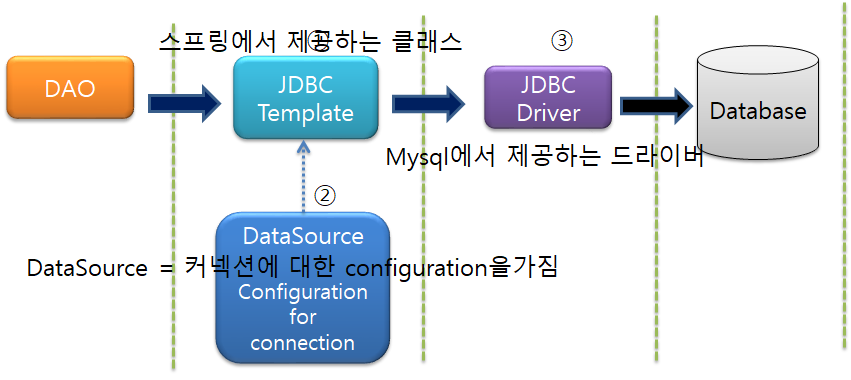
DB에 접근하기 위해 다음 그림과 같이 DAO는 JDBC Template에 이는 JDBC Driver를 통해 Database에 접근하고 DataSource를 이용하여 DB에 실질적으로 커넥션 한다.


2. Data Source

데이터 베이스에 접근하기 위해 DataSource를 사용한다 DataSource의 종류는 다양하지만 DBCP라이브러리의 BasicDataSource를 통상 많이 사용하므로 실습에서도 이를 사용할 예정이다.


3. DAO란?

Data Access Object의 약자로서 서비스는 DB에 대해 아무것도 모르고, 실질적으로 DB에 접근하는 오브젝트를 의미한다. 쉽게 생각하여 DB의 CRUD를 실질적으로 수행하는 코드가 담긴 부분이다.


4. JDBC란?

JDBC란 DB와의 커넥션, SQL 사용, Close 커넥션 등 잡다한 일들을 해주는 프레임 워크이다. 기본 JAVA JDBC는 커넥션 등 try catch의 반복으로 반복적인 코드를 짜야하지만 Spring JDBC를 사용하면 SQL만 코드를 작성하고 나머지는 Spring 프레임워크에서 담당한다.


5. 실습하기

#1) 사전 준비

  • Mysql 5.7.28 설치

Mysql내부에는 csemall라는 DB, offers라는 테이블을 만들고 다음과 같은 구조로 이루어져 있다.

id(INT) name email text
1 Alice Alice@google.com alice
2 Bob Bob@google.com bob
3 Jun Jun@google.com jun


#2) Simple Spring Maven 프로젝트 실행

다음과 같은 helloDB프로젝트를 생성한다.


#3) pom.xml 수정

다음과 같은 dependency를 추가하고 저장을 누르면 maven에 라이브러리가 추가된 것을 확인할 수 있다.

		<dependency>
			<groupId>mysql</groupId>
			<artifactId>mysql-connector-java</artifactId>
			<version>5.1.38</version>
		</dependency>
		<dependency>
			<groupId>org.springframework</groupId>
			<artifactId>spring-jdbc</artifactId>
			<version>4.1.4.RELEASE</version>
		</dependency>
		<dependency>
			<groupId>org.projectlombok</groupId>
			<artifactId>lombok</artifactId>
			<version>1.18.4</version>
		</dependency>
		<dependency>
			<groupId>org.apache.commons</groupId>
			<artifactId>commons-dbcp2</artifactId>
			<version>2.1.1</version>
		</dependency>


#4) jdbc.properties 생성

props라는 패키지를 생성하고 그 밑에 jdbc.properties라는 파일을 생성한다. 파일 내부는 다음과 같다 이는 DB의 정보를 담고 있으며, 생성할 bean에 하드 코딩하는 것보다 좋은 방법이다.

jdbc.username = root
jdbc.password = 사용자 비밀번호를 입력
jdbc.driverClassName = com.mysql.jdbc.Driver
jdbc.url = jdbc:mysql://localhost:3306/csemall


#5) beans.xml 생성

다음과 같이 beans.xml을 생성한다 context:annotation은 DAO클래스에서 사용할 @Autowired를 활성화한다는 의미이며 context:component는 @Component 에노 테이션이 있는 어떤 패키지를 scan 할 건지 명시하는 부분이다. bean으로 생성한 dataSource는 #4에서 생성한 jdbc.properties를 사용하여 실제 DB와 커넥션을 하는 부분이다 dbcp2의 BasicDataSource클래스를 사용하고 있고 이 클래스는 DataSource인터페이스를 따르는 클래스이다. 마지막으로 context:property-placeholder는 앞서 사용할 jdbc.properties가 어떤 위치에 있는지 명시하는 부분이다.

<?xml version="1.0" encoding="UTF-8"?>
<beans xmlns="http://www.springframework.org/schema/beans"
	xmlns:xsi="http://www.w3.org/2001/XMLSchema-instance"
	xmlns:context="http://www.springframework.org/schema/context"
	xsi:schemaLocation="http://www.springframework.org/schema/beans http://www.springframework.org/schema/beans/spring-beans-3.2.xsd
		http://www.springframework.org/schema/context http://www.springframework.org/schema/context/spring-context-3.2.xsd">
	
	<context:annotation-config></context:annotation-config>
	<context:component-scan base-package="csemall"></context:component-scan>

	<bean id="dataSource"
		class="org.apache.commons.dbcp2.BasicDataSource" destroy-method="close">
		<property name="driverClassName"
			value="${jdbc.driverClassName}" />
		<property name="url" value="${jdbc.url}" />
		<property name="username" value="${jdbc.username}" />
		<property name="password" value="${jdbc.password}" />
	</bean>


	<context:property-placeholder
		location="kr/ac/hansung/spring/props/jdbc.properties" />

</beans>


#6) OfferDAO 클래스 생성

src/main/java아래의 csemall이라는 패키지를 만들고 다음과 같은 Class를 생성한다. @Component 에노테이션은 이 클래스는 id가 offerDAO라는 bean을 하나 생성하겠다는 의미이다. 또한 JdbcTemplate를 사용하여 bean에 생성한 dataSource를 주입(@Autowired)시켜 DB와 실질적인 커넥션을 해주는 부분이 담겨있다. getRowCount() 부분은 다음과 같은 sql을 query 하고 결과는 Integer로 받는다는 의미이다.

package csemall;

import javax.sql.DataSource;

import org.springframework.beans.factory.annotation.Autowired;
import org.springframework.jdbc.core.JdbcTemplate;
import org.springframework.stereotype.Component;

@Component("offerDAO")
public class OfferDAO {
	private JdbcTemplate jdbcTemplateObject; //얘는 new를 사용해됨 이후 DataSource는 DI를 통해 주입 시킬예정	

	@Autowired
	public void setDataSource(DataSource dataSource) { //DataSource는 인터페이스인데 우리가 앞서 bean에 선언한 datasource가 이 인터페이스를 따르고 DI한다
		this.jdbcTemplateObject = new JdbcTemplate(dataSource);
	}
	
	public int getRowCount() {
		String sqlStatement = "select count(*) from offers";
		return jdbcTemplateObject.queryForObject(sqlStatement, Integer.class);
	}
}


#6) Offer.java 클래스 생성

Lombok을 이용해 @Getter, @Setter를 생성하였고 DB에 저장된 id, name, email, text를 받는다. 이는 추후에 사용될 클래스이다.

package csemall;

import lombok.Getter;
import lombok.Setter;

@Getter
@Setter
public class Offer {
	private int id;
	private String name;
	private String email;
	private String text;
	
	public Offer() {
		
	}

	public Offer(String name, String email, String text) {
		this.name = name;
		this.email = email;
		this.text = text;
	}
	
	public Offer(int id, String name, String email, String text) {
		this.id = id;
		this.name = name;
		this.email = email;
		this.text = text;
	}
}


#7) MainApp.java 클래스 생성

다음과 같이 코드를 작성한다 ClassPathXmlApplicationContext를 이용하여 beans.xml을 읽어오고 읽어온 context의 offerDAO라는 빈을 이용하여 getRowCount() 함수를 출력한다

package csemall;

import org.springframework.context.support.ClassPathXmlApplicationContext;

public class MainApp {

	public static void main(String[] args) {
		ClassPathXmlApplicationContext context =
				new ClassPathXmlApplicationContext("kr/ac/hansung/spring/csemall/beans/beans.xml");
		
		OfferDAO offerDAO = (OfferDAO) context.getBean("offerDAO");
		System.out.println(offerDAO.getRowCount());
		
		context.close();
	}

}


#8) 실행화면

MainApp.java를 실행하면 다음과 같은 결과를 확인 할 수 있다.

반응형
반응형

1. 수위측정센서란?

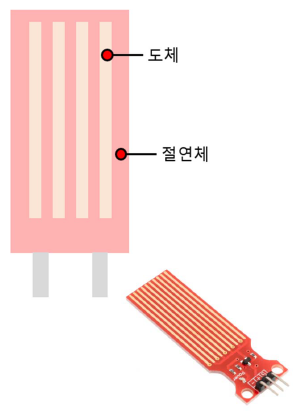
수위 측정 센서란 다음 그림처럼 도체와 절연체로 이루어진 센서로 물이 어느정도 찼는지를 측정하는 센서이다.

  • 접촉식 수위센서는 니켈 같은 도체로 구성된 금속판이 절연체에 띄엄띄엄 떨어져 있고, 개방된 회로라고 하고, 전 류가 흐르지 않음.
  • 반면에, 액체가 접촉하게 되면 띄어져 있는 도체가 연결되기 때문에 저항값이 무한대인 개방된 회로보다 저항값이 줄어들고 전류가 흐를 수 있게 됨.
  • 이를 통해 물에 접촉하는 표면적이 많을수록 출력 저항값이 적어지는 것을 알 수 있고, 센서를 세워서 연결했을 때,센서의 저항값은 액체 높이에 반비례함.
  • 접촉식 수위센서 뿐만 아니라, 수분센서, 강우량 센서 등 액체의 직접적인 접촉에 의한 대부분의 센서들은 이와 같은 저항값에 따른 수분량을 파악함.

수위측정센서 설명


2. 수위측정센서 실습하기

수위 측정 센서를 통해 물이 얼마나 찼는지 측정한다. 사전준비물은 다음과 같다

준비물

준비가 완료되었다면 다음과 같이 회로를 구성합니다.

회로도

회로 구성을 완료하였다면 다음과 같이 코드를 작성합니다.

int water_sensor = 0;

void setup(){
	Serial.begin(9600);
}

void loop(){
	water_sensor = analogRead(A0);
    Serial.println(water_sensor);
}

코드 작성을 완료하였다면 수위를 측정할 수 있습니다.

반응형
반응형

1. 온습도 센서란?

  • 온도와 습도를 동시에 측정이 가능한 센서
  • Arduino Plaground에서 라이브러리 제공
  • 온도와 습도를 동시에 측정하는 것은 아니고 서로 배타적으로 측정값을 읽어옴

온습도 센서


2. 온습도 센서 실습하기

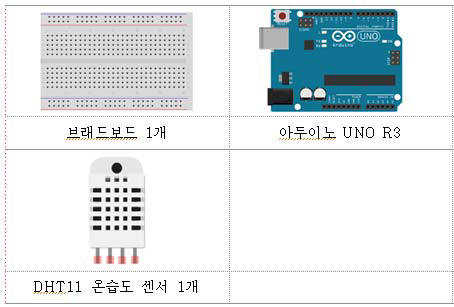
온습도 센서를 통해 온습도를 읽어오는 실습을 진행한다. 사전 준비물은 다음과 같다.

사전 준비물


준비를 마쳤다면 DHT11 온습도 라이브러리를 다운로드한다

http://playground.arduino.cc/main/DHT11Lib 링크를 통해 라이브러리를 다운로드한다

다운로드 1
다운로드2
다운로드3

다운을 완료하였다면 다음과 같이 라이브러리를 추가한다

1. C:/Program Files (x86)/Arduino/libraries/DHT11 폴더를 생성
2. 다운로드한 dht11.h, dht11.cpp 파일 새로 생성한 폴더로 복사
3. 아두이노 개발환경에서 새로 설치한 라이브러리를 인식시키기 위해서는 아두이노 개발환경
   프로그램을 종료하고 다시 시작함

라이브러리 추가


추가를 완료하였다면 다음과 같이 코드를 작성한다.

#include <dht11.h>
#define DHT11PIN 2
dht11 DHT11;
void setup()
{
	Serial.begin(9600);
}
void loop()
{
	Serial.println("\n");
	int chk = DHT11.read(DHT11PIN);
	Serial.print("Read sensor: ");
	switch (chk)
	{
		case DHTLIB_OK: Serial.println(“OK”);
			break;
		case DHTLIB_ERROR_CHECKSUM:
			Serial.println(“Checksum error”);
			break;
		case DHTLIB_ERROR_TIMEOUT:
			Serial.println(“Time out error”);
			break;
		default: Serial.println("Unknown error");
			break;
	}
	
    Serial.print("Humidity (%): ");
	Serial.println((float)DHT11.humidity, 2);
	Serial.print("Temperature (°C): ");
	Serial.println((float)DHT11.temperature, 2);
	delay(2000);
}


코드 작성을 완료하였다면 다음과 같은 결과를 확인할 수 있다.

결과

반응형
반응형

1. AOP란?

만약 다음과 같이 Bean으로 만들 클래스 내부에 로깅, 트랜잭션, 실제 코드인 비즈니스 로직이 함께 있다고 생각해보자. 로깅, 트랜잭션, 비즈니스 로직 순서대로 작동하겠지만 이는 좋은 코드라고 할 수 없다. 따라서 로깅, 트랜잭션과 비즈니스 로직을 분리하기 위해 AOP가 존재한다

Bank 클래스

AOP는 다음 그림처럼 선처리, 후처리(런타임시 짜집기함)를 가능하게 지원하기 때문에 메인 Bean을 만드는 클래스를 따로 두고 로깅, 트랜잭션을 선처리 후처리로 다음과 같은 구조를 만드는 것이다.


다음 그림처럼 a.f()가 실직적인 타겟이되는 joinpoint가 되고 그림 앞에 보라색, 주황색이 선처리 후처리를 담당하는 어드바이스가 된다. 어드바이스는 joinpoint는 Pointcut이 가리키게 된다

다음 그림을 보면 조금더 이해하기 쉽다

AOP 구조 설명


2. AOP실습

#1) spring-aspect를 이용한 실습

1. pom.xml dependency추가

다음과 같은 디펜던시를 추가하면, Maven Dependencies에 spring-aspects라이브러리가 추가된 것을 확인할 수 있다.

		<dependency>
			<groupId>org.springframework</groupId>
			<artifactId>spring-aspects</artifactId>
			<version>4.2.5.RELEASE</version>
		</dependency>


2. Logger 클래스 추가

다음과 같은 Logger클래스를 추가한다.

public class Logger{
	public void aboutToSound() {
		System.out.println("Before: about to sound");
	}
}


3. animal.xml Namespaces 수정 및 aop추가

다음과 같이 Namespaces에 aop를 추가한다

aop 추가

aop추가를 완료하였다면 다음과 같은 코드를 추가한다 <aop:aspect ref="Logger">를 통해 Logger클래스를 Aspect로 이용하겠다는 의미이며, <aop:pointcut expression="execution(void kr.ac.hansung.helloDI.*.sound())" id="selectSound" />를 통해 helloDI패키지의 sound() 함수를 joinpoint로 지정하겠다는 의미이다. 이때 *은 와일드카드로서 어떤 클래스든 상관없다는 의미를 가진다. <aop:before method="aboutToSound" pointcut-ref="selectSound" />는 before어드바이스를 추가하겠다는 의미로 aboutToSound라는 메서드를 이용하며 ref로는 위에 선언한 pointcut의 id를 가진다. 따라서 pointcut은 jointpoint를 가르키고 advice는 그 pointcut을 가리킨다

	<aop:config>
		<aop:aspect ref="Logger" id="myAspect">
			<aop:pointcut
				expression="execution(void kr.ac.hansung.helloDI.*.sound())"
				id="selectSound" />
			<aop:before method="aboutToSound"
				pointcut-ref="selectSound" />
		</aop:aspect>
	</aop:config>


4. 실행

메인 함수를 실행하면 다음과 같은 결과를 확인할 수 있다. 메인 함수에서는 Logger빈을 사용하지 않았지만 다음과 같이 before advice가 실행된 것을 확인할 수 있다.

실행


#2) AOP 에노테이션을 이용한 실습

1. animal.xml수정

다음과 같이 animal.xml을 수정한다 기존 코드를 주석 처리하고 <aop:aspectj-autoproxy>를 추가함으로 에노테이션을 사용하겠다고 명시한다.

<!-- 	<aop:config>
		<aop:aspect ref="Logger" id="myAspect">
			<aop:pointcut
				expression="execution(void kr.ac.hansung.helloDI.*.sound())"
				id="selectSound" />
			<aop:before method="aboutToSound"
				pointcut-ref="selectSound" />
		</aop:aspect>
	</aop:config> -->

	<aop:aspectj-autoproxy></aop:aspectj-autoproxy>


2. Logger 클래스 수정

다음과 같이 Logger 클래스를 수정한다 @Aspect로 클래스가 Aspect라는 걸 명시하고 @Pointcut을 통해 sound() 메서드를 joinpoint로 지정하겠다는 것을 명시하고 @Before로 이전 어드바이스를 추가한다.

@Aspect
public class Logger{
	
	@Pointcut("execution(void kr.ac.hansung.helloDI.*.sound()")
	private void selectSound() {}
	
	@Before("selectSound()")
	public void aboutToSound() {
		System.out.println("Before: about to sound");
	}
}


3. 실행

모두 완료하였다면 다음과 같은 실행화면을 볼 수 있다

실행화면

반응형

+ Recent posts