잡다한 프로그래밍 :: 잡다한 프로그래밍
반응형

1. 템플릿 메소드 패턴의 정의

메소드의 알고리즘의 공격을 정의한다. 알고리즘의 여러 단계중 일부는 서브클래스에서 구현할 수 있고, 이를 이용하면 알고리즘 구조는 그대로 이용하면서 특정단계만 재정의할 수있다.

상속받은 클래스에 기본 틀(추상클래스)이 정해져있고 세부적으로 구현하고싶은 메소드는 서브 클래스에서 구현하게하여 사용하는 방식


2. 예시

비슷한 기능을하는 커피와 티가 있다. 두개는 중복되는 부분이 너무 많은 클래스로서 템플릿 패턴을 적용하면 다음과 같다.

public class Coffee {
    
    void prepareRecipe() {
        boilWater();
        brewCoffeeGrinds();
        pourInCup();
        addSugarAndMilk();
    }
    
    public void boilWater() {
        System.out.println("물 끓이는 중");
    }
    
    public void brewCoffeeGrinds() {
        System.out.println("필터를 통해서 커피를 우려내는 중");
    }
    
    public void pourInCup() {
        System.out.println("컵에 따르는 중");
    }
   
    public void addSugarAndMilk() {
        System.out.println("설탕과 우유를 추가하는 중");
    }
}
public class Tea {
    
    void prepareRecipe() {
        boilWater();
        steepTeaBag();
        pourInCup();
        addLemon();
    }
    
    public void boilWater() {
        System.out.println("물 끓이는 중");
    }
    
    public void steepTeaBag() {
        System.out.println("차를 우려내는 중");
    }
    
    public void pourInCup() {
        System.out.println("컵에 따르는 중");
    }
    
    public void addLemon() {
        System.out.println("레몬을 추가하는 중");
    }
}


다음은 커피와 티가 상속받을 추상클래스이다.

abstract class CaffeineBeverage {
    void final prepareRecipe(){
    	boilWater();
        brew();
        pourInCup();
        addCondiments();
    }
    abstract void brew();
    abstract void addCondiments();
    
    void boilWater() {
        System.out.println("물 끓이는 중");
    }
    void pourInCap() {
        System.out.println("컵에 따르는 중");
    }
}


상속받은 커피 클래스

public class Coffee extends CaffeineBeverage {
	public void brew() {
    	System.out.println("필터로 커피 우려냄");
    }
    public void addCondiments() {
    	System.out.println("설탕과 커피를 추가함");
    }
}


템플릿 메소드에서의 후크

정해진 알고리즘에서의 if문을 통해 과정을 실행시킬지 말지 선택하도록 하는부분을 후크라고 한다.

void prepareRecipe() {
    boilWater();
    brew();
    pourInCup();
        if (customerWantsCondiments()) {
            addCondiments();
        }
}

    boolean customerWantsCondiments() {
        return true;
    }


사용자는 다음과 같이 customerWantsCondiments() 메소드를 재정의 하여 과정을 컨트롤 할 수 있다.

public class CoffeeWithHook extends CaffeineBeverageWithHook {
    
    public void brew() {
        // implements
    }
    
    public void addCondiments() {
        // implements
    }
    
    public boolean customerWantsCondiments() {
        String answer = getUserInput();
        
        if (answer.toLowerCase().startsWith("y")) {
            return true;
        }
        
        return false;
    }
    
    private String getUserInput() {
        String answer = null;
        
        System.out.println("커피에 우유와 설탕을 넣어 드릴까요?");
        
        BufferedReader in = new BufferedReader(new InputStreamReader(System.in));
        
        try {
            answer = in.nextLine();
        } catch (IOException ex) {
            System.err.println("IO 오류");
        }
        
        if (answer == null) {
            return "no";
        }
        
        return answer;
    }
}

3. 템플릿 메소드 패턴의 예시

spring에서 디스패쳐 서블릿의 doService라는 함수가 템플릿 메소드로 구성되어있다. 아래와 같이 FrameworkServlet을 상속받아 doService메소드를 디스패쳐 서블릿에서 구체화하여 사용하고 있고 이는 템플릿 메소드패턴의 적절한 예시이다.

public class DispatcherServlet extends FrameworkServlet {

    ...

    @Override
    protected void doService(HttpServletRequest request, HttpServletResponse response) throws Exception {
        logRequest(request);

        ...중략...

    }

    ...
}
반응형
반응형

1. 빌더 패턴이란?

선택적인 파라미터가 많을수록 파라미터의 제공 상태를 일관성있게 해주고(어떤 파라미터를 제공하는지, null인지) 최종적으로 생성된 객체를 return하는 패턴


2. 예시


만약 다음과 같은 UserInfo 클래스가 있다고 할때 생성자를 통해 객체를 생성하게 될때 파라미터의 개수가 많거나 Null이거나 하는경우 어떠한 파라미터를 제공하는지 알아보기도 힘들고 객체 생성이 용이하지않음.

public class UserInfo {
	private String name;
	private int age;
    
	public UserInfo(String name, int age) {
		this.name = name;
		this.age = age;
	}

	public String getName() {
		return name;
	}

	public void setName(String name) {
		this.name = name;
	}

	public int getAge() {
		return age;
	}

	public void setAge(int age) {
		this.age = age;
	}

	public void getUserInfo() {
		System.out.println(name, age);
	}
}


따라서 빌더패턴을 적용해보면 다음과 같다. 아래와 같이 set을 통해 변수값을 지정하고 build를 통해 객체를 생성하는 방식이다. 사용자는 set을 통해 파라미터값을 정하기 때문에 생성자 방식처럼 순서에 맞게 작성하지 않아도 된다는 장점이 있고 예시는 클래스를 따로 나눴지만 내부 클래스를 이용해 하나의 클래스처럼 이용할 수 있다.

public class UserInfoBuilder {
	private String name;
	private int age;

	public UserInfoBuilder setName(String name) {
		this.name = name;
		return this;
	}

	public UserInfoBuilder setAge(int age) {
		this.age = age;
		return this;
	}

	public UserInfo build() {
		return new UserInfo(name, age);
	}
}
UserInfoBuilder userInfoBuilder = new UserInfoBuilder();
UserInfo userInfo3 = userInfoBuilder.setName("테스터3").setAge(26).build();


롬복을 이용하게 되면 @Builder 어노테이션으로 같은 기능을 수행하여 코드량을 줄일 수 있다.


3. 추상 팩토리 패턴과 빌더패턴의 차이

앞서 나온 추상팩토리 패턴과 빌더패턴 모두 객체를 생성하는 관점에서 비슷하게 느껴질 수 있으나, 다음과 같은 차이가 있다.

추상팩토리는 제품의 최종단계가 아닌 원재료 즉 전체를 위한 하위객체를 바로 리턴하고,

public class NYPizzaingredientFactory implements PizzaIngredientFactory{
	@Override
	public Dough createDough() {
		return new ThinCrustdough();
	}

	@Override
	public Sauce createSauce() {
		return new MarinaraSauce();
	}
 }

빌더 패턴은 정보가 합쳐진 최종 객체를 반환한다는 특징이 있다.


쉽게 생각해서 빌더패턴은 최종 결과물을 사용자가 받아보게 되고, 팩토리 패턴은 최종 결과물에 필요한 객체를 받아보게 된다.

반응형
반응형

1. 퍼사드 패턴의 정의

어떤 시스템의 일련의 인터페이스에 대한 통합된 인터페이스를 제공한다. 즉 여러 클래스의 복잡한 처리과정을 하나의 인터페이스로 묶어서 사용한다.


2. 예시

영화를 보기 위해 일련의 과정 1. 팝콘 기계를 키고 튀긴다 2. 전등을 조절한다 3. 스크린을 내리고 프로젝트를 켠다 .... 같은과정을 하나의 통합 인터페이스로 묶어 실행하는 과정


HomeTheaterFacade 클래스

public class HomeTheaterFacade {
 Amplifier amp;
 Tuner tuner;
 DvdPlayer dvd;
 CdPlayer cd;
 Projector projector;
 TheaterLights lights;
 Screen screen;
 PopcornPopper popper;
 
 public HomeTheaterFacade(Amplifier amp, 
     Tuner tuner, 
     DvdPlayer dvd, 
     CdPlayer cd, 
     Projector projector, 
     Screen screen,
     TheaterLights lights,
     PopcornPopper popper) {
 
  this.amp = amp;
  this.tuner = tuner;
  this.dvd = dvd;
  this.cd = cd;
  this.projector = projector;
  this.screen = screen;
  this.lights = lights;
  this.popper = popper;
 }
 
 public void watchMovie(String movie) {
  System.out.println("Get ready to watch a movie...");
  popper.on();
  popper.pop();
  lights.dim(10);
  screen.down();
  projector.on();
  projector.wideScreenMode();
  amp.on();
  amp.setDvd(dvd);
  amp.setSurroundSound();
  amp.setVolume(5);
  dvd.on();
  dvd.play(movie);
 }
//기타 메소드
}


퍼사드 패턴을 이용하지 않았다면 Movie를 볼때의 과정을 전부 직접 호출했어야하고, 다른 과정 음악듣기 같은경우 Movie와 다른 과정으로 직접 실행해야한다 하지만 퍼사드 패턴을 이용하면 다음과 같이 실행할 수 있다.

HomeTheaterFacade homeTheater = 
    new HomeTheaterFacade(amp, tuner, dvd, cd, 
      projector, screen, lights, popper);
 
  homeTheater.watchMovie("Raiders of the Lost Ark");
반응형
반응형

1. 어댑터 패턴의 정의

한 클래스의 인터페이스를 클라이언트에서 사용하고자 하는 다른 인터페이스로 변환하는 역할.

아래 그림에서 어탭터 클래스를 만드는것을 의미함


2. 예시

칠면조 클래스를 오리 클래스로 바꾸는 과정


Duck 인터페이스

public interface Duck {
	public void quack();
}


MallardDuck  클래스

public class MallardDuck implements Duck {
	public void quack() {
    	System.out.println("오리!");
    }
}


Turkey 인터페이스

public interface Turkey {
	public void gobble();
}


WildTurkey 클래스

public class WildTurkey implements Turkey {
	public void gobble {
    	System.out.println("칠면조!");
    }
}


어댑터 클래스

public class TurkeyAdapter implements Duck {
	Turkey turkey;
    
    public TurkeyAdapter(Turkey turkey) {
    	this.turkey = turkey;
    }
    
    public void quack() {
    	turkey.gobble();
    }
}


Test클래스

public class Test {
	public static void main(String[] args) {
		MallardDuck duck = new MallardDuck();
        
        WildTurkey turkey = new WildTurkey();
        Duck turkeyAdapter = new TurkeyAdapter(turkey);
        
        System.out.println(duck.quack());
        System.out.println(turkeyAdapter.quack());


즉 칠면조 클래스를 덕인터페이스에 맞게 변환하여 오리처럼 사용할 수 있게 해주는 패턴이 어댑터 패턴이다.

반응형
반응형

1. 커맨드 패턴의 정의

커맨드 패턴은 객체의 행위(메서드)를 클래스로 만들어 캡슐화 하는 패턴입니다.


즉, 어떤 객체(A)에서 다른 객체(B)의 메서드를 실행하려면 그 객체(B)를 참조하고 있어야 하는 의존성이 발생합니다.

그러나 커맨드 패턴을 적용하면 의존성을 제거할 수 있습니다.


즉 내가 B라는 객체의 메서드를 실행 시킬때 B를 실행시키는걸 모른채로 메서드를 실행하게 만든다.


2. 예시

다음과 같이 Lamp를 on 하는 클래스가 주어지고, 이를 사용할 Remote 클래스를 다음과 같이 만든다.


Lamp 클래스

public class Lamp {
    public void On(){
        System.out.println("Lamp on");
    }
}


Remote 클래스

public class Remote {
    private Lamp lamp;

    public Remote(Lamp lamp){
        this.lamp = lamp;
    }

    public void execute(){
        lamp.on();
    }
}


Client 클래스


public class Client {
    public static void main(String args[]){
        Lamp lamp = new Lamp();
        Remote remote = new Remote(lamp);
        remote.execute();
    }
}

만약 다음과 같이 Remote코드를 작성했을 경우 Lamp ON 이외에 다른 클래스(Streo On)가 주어질 경우 Remote가 수정되어야 하는 문제가 생긴다. 따라서 커맨드 패턴을 적용하면 다음과 같다.


Command 클래스

public interface Command {
          public void execute();
 }


LightOnCommand 클래스

public class LightOnCommand implements Command {

          Light light;   //이 Light 객체는 실제 불키는 방법을 알고있는 리시버 객체

          public LightOnCommand(Light light) {
                   this.light = light;
          }

          public void execute() {
                   light.on();
          }
 }


SimpleRemoteControl 클래스 (인보커)

public class SimpleRemoteControl {
          Command slot;

          public SimpleRemotecontrol() { }
         
          public void setCommand(Command command) {
                   slot = command;
          }

          public void buttonWasPressed() {
                   slot.execute();
          }
 }


RemoteControlTest 클래스 (클라이언트)

public class RemoteControlTest {
          public static void main(String[] args) {
          
                   SimpleRemoteControl remote = new SimpleRemoteControl();
                   Light light = new Light();
                   LightOnCommand lightOn = new LightOnCommand(light);

                   remote.setCommand(lightOn);
                   remote.buttonWasPressed();
          }           
 }


즉 커맨드 패턴은 다음과 같은 구조를 띄게 된다. 따라서 Lamp 이외의 클래스를 사용하려면 LightOnCommand와 같은 XXXCommand 클래스를 만들고 적용할 수 있기 때문에 확장에 용이하다.


3. 커맨드 패턴의 적용 예시

java의 Thread가 커맨드 패턴이 적용된 예시이다.

메인 클래스의 Thread 객체에서 start를 통해 Command의 run 메소드를 실행시키지만 Thread 입장에서는 어떤것을 실행시키는지 알 수 없다.

따라서 run = execute를 의미, start = buttonWasPressed를 의미한다.

public class Main {
  public static void main(String[] args) {
    Thread t = new Thread(new Command());
    t.start();  /* run을 실행하지만 Command가 무엇을 하는지는 모른다 */
  }
}

class Command implements Runnable {
  @Override
  public void run() {
    System.out.println("RUN!");
  }
}
반응형
반응형

1. 팩토리 메소드 패턴의 정의

객체를 생성하기 위한 인터페이스를 정의하고, 어떤 클래스의 인스턴스를 만들지는 서브클래스에서 결정하게 한다.


단순한 팩토리 패턴?


다음과 같은 orderPizza 메소드가 있다고 할때 이 메소드는 pizza의 종류가 변경되면 코드가 변경되어야 한다. 따라서 변경되는 부분과 변경되지 않는 부분을 분리할 필요가 있다.

 Pizza orderPizza(String type) {
       Pizza pizza;
       
       if(type.equals("cheese")) pizza = new CheesePizza();
       else if(type.equals("greek")) pizza = new GreekPizza();
       else if(type.equals("pepperoni")) pizza = new PepperoniPizza();       

       pizza.prepare();
       pizza.bake();
       pizza.cut();
       pizza.box();

       return pizza;
 } 


다음과 같이 변경되는 부분을 새로운 SimplePizzaFactory라는 클래스도 분리하면 다음과 같다.

PizzaStore는 SimplePizzaFactory 를 이용하여 피자를 생성하고 이는 앞선 문제를 해결할 수 있다. (Spring 에서 Bean을 생성할 때 사용했던 방법과 매우 유사하다.)

public class SimplePizzaFactory {	

	public Pizza createPizza(String type){
		Pizza pizza = null;

		if(pizza.equals("cheese")) pizza = new CheesePizza();
		if(pizza.equals("pepper")) pizza = new PepperoniPizza();
		if(pizza.equals("clam")) pizza = new ClamPizza();
		if(pizza.equals("veggie")) pizza = new VeggiePizza();

		return pizza;

	}
 }
 public class PizzaStore{

	SimplePizzaFactory simplePizzaFactory;
	
	public PizzaStore(SimplePizzaFactory simplePizzaFactory) {
		this.simplePizzaFactory = simplePizzaFactory;
	}
    
	public Pizza orderPizza(String type){

		Pizza pizza;

		pizza = simplePizzaFactory.createPizza(type);
        
		pizza.prepare();
		pizza.bake();
		pizza.cut();
		pizza.box();
        
		return pizza;

	}
 }


하지만 뉴욕, 시카고등 지역별로 같은 피자여도 조금씩 다르게 만들기 원하는 상황에서는 어떤방법으로 해결하면 좋을까?


팩토리 메소드패턴

다음과 같이 PizzaStore를 추상클래스로 선언하고 기존 팩토리 클래스로부터 create하는 부분을 추상 메소드로 선언한다.


PizzaStore 추상 클래스

public abstract class PizzaStore{ 추상 클래스
	public Pizza orderPizza(String type){
		Pizza pizza;
		
		pizza = createPizza(type);
		
		pizza.prepare();
		pizza.bake();
		pizza.cut();
		pizza.box();

		return pizza;
	}
	abstract Pizza createPizza(String type); 추상 메소드
}


NYPizzaStore 클래스

public class NYPizzaStore extends PizzaStore{

	@Override
	public Pizza createPizza(String type){
		Pizza pizza = null;
		if(type.equals("cheese")) pizza = new NYStyleCheesePizza();
		if(type.equals("peper")) pizza = new NYStylePepperoniPizza();
		if(type.equals("clam")) pizza = new NYStyleClamPizza();
		if(type.equals("veggie")) pizza = new NYStyleVeggiePizza();

		return pizza;
	}
 } 


Test클래스

public class PizzaTestDrive {
	public static void main(String[] args) {
        
        PizzaStore nyStore = new NYPizzaStore();		
        
        Pizza nySytpePizza = nyStore.orderPizza("cheese");
        System.out.println(nySytpePizza.getname());
	}
 } 


전체적인 구조는 다음과 같다.

팩토리 메소드 패턴에서는 서브 클래스에서 어떤 클래스를 만들지 결정하게함으로서 (즉 추상클래스를 상속받은 NYPizzaStore에서 추상메소드를 수행함) 객체 생성을 캡슐화 한다.


이러한 팩토리 메소드 패턴에서 찾아볼 수 있는 객체 지향적 디자인 원칙은 의존성 뒤집 이다.

기존 PizzaStore는 각 피자가 바뀔때마다 수정되어야하는 방식의 의존성을 가지고 있었으나.

PizzaStore -> NYStyleCheesePizza

PizzaStore -> ChicagoStypeCheesePizza

PizzaStore -> NYStyleVeggiePizza


피자 인터페이스를 사용하여 인터페이스에만 의존적이고 나머지 실제 구현 객체는 인터페이스에 의존적인 관계가 되어 의존성 뒤집기 원칙을 가지고 있다.

PizzaStore -> Pizza

Pizza <- NYStyleCheesePizza

Pizza <- ChicagoStyleCheesePizza

Pizza <- NYStyleVeggiePizza


2. 추상 팩토리 패턴

피자를 만들기 위한 원재료를 처리하는 방법에 대해 고민해보자.

지역별 공장들을 추상화한 인터페이스를 가지는 구조로 작성한다


PizzaIngredientFactory 인터페이스

public interface PizzaIngredientFactory {
	public Dough createDough();
	public Sauce createSauce();
	public Cheese createCheese();
	public Veggies[] createVeggies();
	public Pepperoni createPepperoni();
	public Clams createClams();
 } 


NYPizzaIngredientFactory 클래스

public class NYPizzaingredientFactory implements PizzaIngredientFactory{
	@Override
	public Dough createDough() {
		return new ThinCrustdough();
	}

	@Override
	public Sauce createSauce() {
		return new MarinaraSauce();
	}

	@Override
	public Cheese createCheese() {
		return new ReggianoCheese();
	}

	@Override
	public Veggies[] createVeggies() {
		Veggies veggies[] = { new Farlic(), new Onion(), new Mushroom(), new RedPepper() };
		return veggies;
	}

	@Override
	public Pepperoni createPepperoni() {
		return new SlicedPepperoni();
	}

	@Override
	public Clams createClams() {
		return new Freshclams();
	}
 }


전체적인 구조는 다음과 같다


3. 팩토리 메소드 패턴과 추상 팩토리의 차이?

  1. 팩토리 메소드 패턴은 상속, 추상 팩토리는 인터페이스를 이용한다.
  2. 팩토리 메소드 패턴은 단일 메소드가 여러 객체를 생성한다.
  3. 추상 팩토리 패턴은 여러 메소드에서 여러 객체를 생성하여 하나의 제품군처럼 만들어서 사용(create 도우, 치즈, 버섯 = 뉴욕 공장)
반응형
반응형

1. 옵저버 패턴의 정의

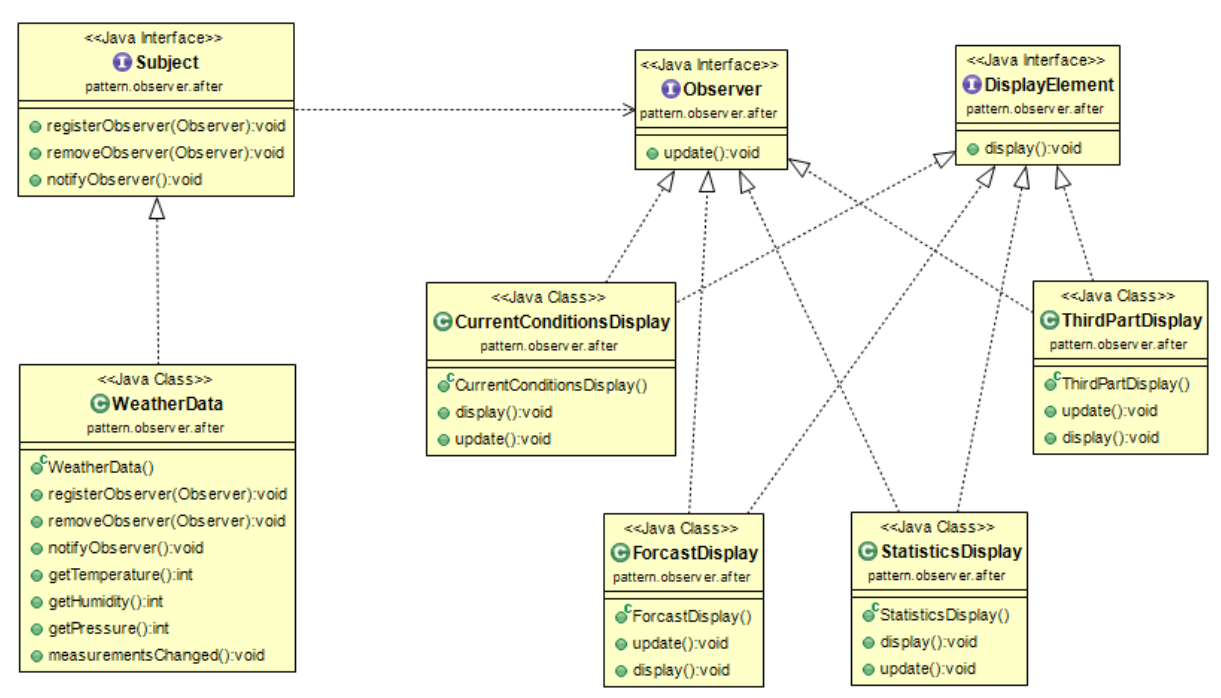
한 객체의 상태가 바뀌면 그 객체에 의존하는 다른 객체들한테 연락이 가고 자동으로 내용이 갱신되는 방식으로 일대다 의존성을 정의함. 옵저버 패턴은 실제 구현할 수도, 자바 내장 패턴을 이용할 수도 있다.

옵저버 패턴은 상태를 저장하고 있는 주제 객체와, 상태가 변하는것을 바라보고 있는 옵저버들로 이루어져 있다.


옵저버 패턴의 구조


Subject interface

public interface Subject {
    public void registerObserver(Observer observer);    // 등록하기 위한 observer를 인자로 받는다.
    public void deleteObserver(Observer observer);    // 삭제하기 위한 observer를 인자로 받는다.
    public void notifyObserver();    // subject 객체의 상태(소식)이 변경되었을 때 모든 observer들에게 알리 위해 호출되는 메소드
}


Observer interface

public interface Observer {
    public void update(float temp, float humidity, float pressure);    // 상태가 갱신되었을 때 전달할 정보들을 인자로 받는다.
}


DisplayElement interface

public interface DisplayElement
	public void display();
}


Subject 구현 클래스

import java.util.ArrayList;
 
public class WeatherData implements Subject {
    // field    
    private float temp;                        // // 느슨한 결합(Loose Coupling)을 위해 상위형식으로 구성을 사용
    private float humidity;
    private float pressure;
    
    // constructor
    public WeatherData() {
        private ArrayList<Observer> observers = new ArrayList<>();    
    }
    
    @Override
    public void registerObserver(Observer observer) {
        observers.add(observer);
    }
 
    @Override
    public void deleteObserver(Observer observer) {
        int i = observers.indexOf(observer);
        if(i>=0) {
            observers.remove(i);
        }
        
    }
 
    // subject객체가 가진 목록 즉, 모든 observer들의 update() 호출
    @Override
    public void notifyObserver() {    
        for(int i = 0 ; i<observers.size() ; i++ ){
            Observer observer = observers.get(i);
            observer.update(this.temp, this.humidity, this.pressure);
        }
    }
    
    // subject의 상태(소식)이 변경되었을 때 호출 : observer들에게 상태를 알림
    public void measurementsChanged() {
        notifyObserver();
    }
    
    // subject 객체의 상태를 갱신
    public void setMeasurements(float temp, float humidity, float pressure) {    // 
        this.temp = temp;
        this.humidity = humidity;
        this.pressure = pressure;
        
        measurementsChanged();
    }
 
}


Observer 구현 클래스

public class CurrentConditionDisplay implements Observer, DisplayElement {
 
    private float temp;
    private float humidity;
    private float pressure;
    
    private Subject weatherData;
   
    public CurrentConditionDisplay(Subject weatherData) {
        this.weatherData = weatherData;
        this.weatherData.registerObserver(this);
    }
    
    
    @Override
    public void update(float temp, float humidity, float pressure) {
        this.temp = temp;
        this.humidity = humidity;
        
        display();
    }
    
    @Override
    public void display() {
        System.out.println("Current Condition: "+this.temp+"F degrees and "+this.humidity+"% humidity and "+pressure+" pressure");
    }       
}


Test 클래스

public class WeatherStation {
    public static void main(String args[]) {
        WeatherData weatherData = new WeatherData(); // 서브젝트 객체 생성과 동시에 리스트 생성됨
        
        CurrentConditionDisplay currentConditionDisplay = new CurrentConditionDisplay(weatherData); //옵저버 클래스 생성하면서 등록됨.
        
        weatherData.setMeasurements(32, 65, 30); 값을 설정하게 되면 옵저버 update 메소드를 호출함
        
    }
}


앞서 나온 방식을 이용하게되면 3가지 정보를 모두 넘겨주지만 실제 옵저버 클래스에서는 temp와 humidity만 사용하는데 모든 정보를 넘겨받는다는 점과, 정보를 받고싶은 상황을 선택하고 싶을 경우에는 어떻게 구현해야할까?

observer.update(this.temp, this.humidity, this.pressure);


2. 옵저버 패턴의 push vs pull

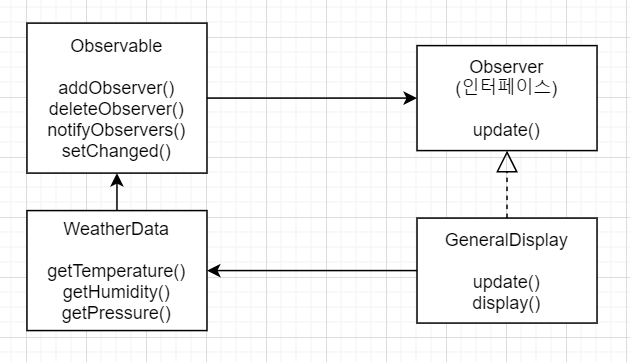
앞서 나온 정보가 변경될 경우 주제에서 옵저버에게 변경사항을 전달해주는 방식을 push방식이라고 한다. 이와 다르게 옵저버가 필요할 때마다 정보를 요청하는 방식을 pull방법이라 한다. JAVA에서 제공하는 옵저버 클래스를 활용하여 pull방식을 구현해보자.


Java 내장 옵저버를 이용하면 다음과 같다. Observable은 인터페이스가 아닌 클래스이고 앞서만든 Subject interface와 같은 역할을 한다.


Observable 클래스를 상속받은 WeatherData

import java.util.ArrayList;
 
public class WeatherData extends Observable {

	private float temp;                        // // 느슨한 결합(Loose Coupling)을 위해 상위형식으로 구성을 사용
    private float humidity;
    private float pressure;
    
    public WeatherData() {  } // Array를 사용할 필요 X
    
    // subject의 상태(소식)이 변경되었을 때 호출 : observer들에게 상태를 알림
    public void measurementsChanged() {
    	setChanged();
        notifyObservers();
    }
    
    public void setMeasurements(float temp, float humidity, float pressure) {    // 
        this.temp = temp;
        this.humidity = humidity;
        this.pressure = pressure;
        
        measurementsChanged();
    }
 	public float getTemperature(){
    	return temperature;
    }
    public float getHumuduty(){
    	return humuduty;
    }
    public float getPressure(){
    	return pressure;
    }
}


Observer 구현 클래스

public class GeneralDisplay implements Observer, DisplayElement {
 	
    Observable observable;
    private float temp;
    private float humidity;
       
    public CurrentConditionDisplay(Observable observable) {
        this.observable = observable;
        observable.addObserver(this);
    }
    
    public void update(Observable obs, Object arg) { //값을 받는것이 아닌 객체를 통해 get메소드로 원하는 정보를 가져간다.
    	if(obs instaceof WeatherData){
        	WeatherData weatherData = (WeatherData)obs;
            this.temperature = weatherData.getTemperature();
            this.humidity = weatherData.getHumidity();
        	display();
        }
    }
    
    public void display() {
        System.out.println("Current Condition: "+this.temp+"F degrees and "+this.humidity+"% humidity and "+pressure+" pressure");
    }       
}


pull 방식은 다음과 push방법처럼 정보를 주입 받는것이 아니라 다음과 같이 객체를 받아 원하는 정보를 가져간다는 특징이 있다.

public void update(Observable obs, Object arg) { //값을 받는것이 아닌 객체를 통해 get메소드로 원하는 정보를 가져간다.


setChanged()는 무엇을 의미할까? Observable 슈퍼 클래스에 정의된 flag이다. 즉 변화로 인정해서 update할지 말지 의미하는것이고 내가 온도변화를 3도 이상 변했을경우만 setChange를 할수 있게 변경할 수 있다.


3. 옵저버 패턴의 예시

MVC패턴에서 옵저버 패턴을 찾아볼 수 있다. 옵저버 패턴이란 상태변화를 통지해 주는것을 의미했는데 MVC패턴은 다음과같다.

  1. 컨트롤러에 의해 Model의 상태가 변함 (Model의 값이 변함)
  2. 뷰는 모델에 값이 변할때 상태 변화를 모델로부터 직접 가져옴(Pull)
반응형
반응형

1. 프록시 패턴의 정의

Proxy는 우리말로 대리자라는 뜻입니다. 다른 누군가를 대신해서 그 역할을 수행하는 존재입니다. 즉 프록시에게 어떤 일을 대신 시키는 것.


구체적으로 인터페이스를 사용하고 실제 기능을 하는 타겟 클래스 대신 이를 대신할 프록시 클래스를 만들고 프록시 클래스가 타겟 클래스를 호출하는 것

이때 프록시는 흐름제어만 할 뿐 결과값을 조작하거나 변경시키면 안된다.


아래와 같은 구조로 예시를 들면 다음과 같다.


ServiceI 인터페이스

public interface ServiceI {
 
    String run();
}


TargetService 클래스

public class TargetService implements ServiceI{
 
    @Override
    public String run() {
        return "실제 클래스입니다.";
    }
     
}


ProxyService클래스

public class ProxyService implements IService{
 
    ServiceI service;
     
    @Override
    public String run() {
        System.out.println("흐름을 바꿈 결과 값은 같다.");
         
        service = new Service(); 
        return service.run();
    }
 
}


클라이언트

public class Main {
 
    public static void main(String[] args) {
        //직접 호출하지 않고 프록시를 호출한다.
        ServiceI proxy = new ProxyService();
        System.out.println(proxy.run());
    }
}

2. 데코레이터 패턴의 정의


객체에 추가적인 요건을 동적으로 첨가한다.

데코레이터는 서브클래스를 만드는 것을 통해서 기능을 유연하게 확장할 수 있는 방법을 제공한다. 즉 타깃에 부가적인 기능을 부여하는것을 의미한다


아래와 같은 구조로 예시를 들면 다음과 같다.


Beverage 클래스

public abstract class Beverage {
    
    String description = "no title"; //음료 이름
 
    public abstract int cost();
 
    public String getDescription() {
        return description;
    }
    
}


CaffeLatte 클래스

public class CaffeLatte extends Beverage {
 
    public CaffeLatte() {
        super();
        description = "카페라떼";
    }
 
    @Override
    public int cost() {
        return 5000;
    }
}


CondimentDecorator 클래스

public abstract class CondimentDecorator extends Beverage {
    
    public abstract String getDescription();
}


Cream클래스

public class Cream extends CondimentDecorator {
 
    Beverage beverage;

    public Cream(Beverage beverage) {
        super();
        this.beverage = beverage;
    }
 
    @Override
    public String getDescription() {
        return beverage.getDescription() + ", 크림";
    }
 
    @Override
    public int cost() {
        return beverage.cost() + 500;
    }
}


Main클래스

public class Test {
    public static void main(String[] args) {
        
        Beverage beverage = new CafeLatte();
        beverage = new Cream(beverage); //beverage 필드에 CaffeLatte 인스턴스 저장
        
        System.out.println("가격 : " + beverage.cost());
    }
}

3. 프록시, 데코레이터의 차이

둘다 기존 타겟 객체가 아닌 다른곳에서의 행위가 일어나므로 비슷하게 느껴지지만 프록시 패턴은 요청을 위임해주는데 의의가 있고, 데코레이터 패턴은 부가기능을 추가하는데에 있다.


4. spring AOP개념에서의 proxy는?

아래와 같이 트랜잭션을 분리할때 proxy는 디자인 패턴으로 봤을때 프록시 패턴인가? 데코레이터 패턴인가?

기존 타겟코드(Dao의 요청을 업데이트하는부분)에 트랜잭션을 적용하는 부분으로 바라보았을때는 데코레이터 패턴의 역할도 있고, 타겟클래스 전후로 요청을 위임하는 부분으로 보았을때는 프록시 패턴으로 바라볼수도 있다.

public class TransactionHandler implements InvocationHandler {
    private Object target;
    private PlatformTransactionManager transactionManager;
    private String pattern; //트랜잭션을 적용할 메소드 이름 패턴
    
    public void setTarget(Object target) {
        this.target = target;
    }
    
    public void setTransactionManager(PlatormTransactionManager transactionManager) {
        this.transactionManager = transactionManager;
    }
    
    public void setPattern(String pattern) {
        this.pattern = pattern;
    }
    
    public Object invoke(Object proxy, Method method, Object[] args) throws Throwable {
        if(method.getName().startsWith(pattern)) {
            return invokeInTransaction(method, args);
        } else {
            return method.invoke(target, args);
        }
    }
    
    private Object invokeInTransaction(Method method, Object[] args) throws Throwable {
        TransactionStatus status = this.transactionManager.getTransaction(new DefaultTransactionDefinition());
        try {
            Object ret = method.invoke(target, args);
            this.transactionManager.commit(status); //타깃 호출후 예외가 발생하지 않으면 commit
            return ret;
        } catch (InvocationTargetException e) { //예외가 발생하면 트랜잭션 롤백
            this.transactionManager.rollback(status);
            return e.getTargetException();
        }
    }
}
반응형

+ Recent posts